
How to select your research topic?

(you can enrol in my self-study course on how to select a research topic here: https://www.udemy.com/dr-kriukows-dissertation-training-part-one/?couponCode=DISCOUNT) I get this question a lot in your messages through Facebook, so I compiled some advice on how to select your research topic. First, choose a topic that is interesting to you. It may seem obvious, but this will make the research process more fun and engaging for you, especially if you are undertaking a Doctoral degree which means that you will spend not between 3 and 12 months researching and writing about it (as would be the case if you were working on your master’s dissertation), but 3 to 5 years! I have said it many times before and will say it again – considering the amount of workload, stress and frustration that I experienced throughout the 3 years of working on my doctoral thesis, there is no way on earth that I would have completed it if I hadn’t been genuinely interested in what I was researching! I treated this whole process as a personal quest for answers to the questions I asked in my thesis, and this enabled me to move forward whenever I had any sort of doubts. “OK”, I can hear you asking, “but how do I know what topic is interesting to me?”. Well, there are most likely some general topics within your field that attract your attention more than the others. So, within the field of Teaching English to Speakers of Other Languages (TESOL), for example, you may enjoy learning about Second Language Acquisition (SLA) theories more than about Language Testing, or prefer reading about teaching speaking skills more than about teaching reading skills, and so on. To have this, no matter how vague or distant, idea about what you find more engaging to read/learn about within your field is, in fact, a very good starting point to continue researching the topic in order to narrow down the specific issues that you may want to research. The next step is to read, and read, and read… Read academic articles on the topic that interests you. Use your university’s online library resources, or Google search engines if you are not a university student, to access all kinds of articles that relate to your area of interest. Start with broad searches – if you are looking for articles on “teaching speaking skills in English”, you can initially use this very phrase in your searches. In the process of reading, you are likely to become interested in more and more specific aspects of this topic. You may find, for example, that you find the methodology of task-based teaching interesting, particularly because in your own educational contexts you have never come across it. Therefore, you decide to read on “the use of task-based methodology for teaching speaking skills to [Chinese, Spanish, Russian, etc.] learners”, as you wonder whether it has ever been attempted and with what results. You can now both narrow down your searches by typing this kind of phrase next time you look for more articles to read, and use the reference list at the end of each article to find other relevant published work. You can read books too, but I think that at this stage it is more time-efficient to focus on articles, as not only are they shorter and you can, therefore, read about more different issues within the topic, which are discussed by more authors who adopt different perspectives on it, but also academic articles usually tend to cite more sources, be more critical and more explicit about the existing gaps in knowledge. To determine these gaps in research/knowledge, is an important step in developing a research topic that will not only be interesting to you, but also, potentially, to the wider audience. This does not mean that you absolutely have to find a topic that has never been researched before. Instead, this could be something that needs further research, the claims that need more evidence, etc. You will know about this not only by just reading these various articles that are now becoming increasingly focused on the issue of your interest and noticing certain patterns in them, but also by the authors’ explicitly stating that a given issue calls for further investigation. The sections of academic articles to be closely analysed in this regard are the Literature Review and Implications/Further Research/Conclusions sections. The Literature Review section will not only give you plenty of ideas about the existing discussions within the field and send you directly to the sources that may be of interest to you, but it will also outline the topics that are controversial and/or under-researched. The concluding sections, in turn, are almost certain to be very explicit about further research that needs to be carried out – and this is precisely what you were looking for, isn’t it? If you would like to learn more about developing a research topic, I have a whole self-study course about it! (You can enrol here https://www.udemy.com/dr-kriukows-dissertation-training-part-one/?couponCode=DISCOUNT) The course follows the following topics: – What is a “good” research idea and how to develop it? – What to read? How do you know what topics you should start with? What kind of materials to focus on? Which sections of published work should you pay particular attention to? – Where to look? Where can you find the literature that is relevant? – How to read? What reading techniques should you use? – How to organise your reading sources? How to make sure that you are on top of your reading and don’t loose these valuable sources and quotations? – When should you start writing? – What to write and when? – What is free writing and how is it going to help you? – Is Thinking just a waste of time, or is it just as important an activity as reading and writing? – How to come up with research questions? – What types of research questions are there? – What is a “good” research question? – How to incorporate your idea and research questions into the Literature Review chapter?
3 strategies that will help you succeed (and stay sane) at the university, at work, and in life

These are my 2 daughters. The younger one was born in the 2nd month of the 4 that I was given to write my Master’s dissertation. At the time, I was also working full-time, which eventually gave way to 2 part-time research assistant positions that I undertook when doing my Doctoral degree. At the time of the PhD study I was also constantly working on developing my publication base, giving lectures and organising workshops, already developing a follow-up project to my PhD research, and applying for funding to carry it out. I recently reflected on that difficult time as I was preparing to give a lecture to Master’s students at the University of Edinburgh, in which I was expected to give some advice on writing the dissertation. I talked about choosing the topic and methods of data collection, structuring the dissertation, and other aspects of this long and demanding journey. I also talked about the importance of time-keeping, organisational skills and organising your own workload, which I believe are all crucial factors that enabled me to “survive” that difficult period. Here, I chose 3 key strategies and skills that do not relate exclusively to writing, or to studying, for that matter, but also to working as a researcher, or managing any other difficult workload. I think it is these 3 strategies that ultimately enabled me to succeed academically and professionally, while staying sane at the same time… “Bird by bird”, or setting up short-term goals. “Thirty years ago my older brother, who was ten years old at the time, was trying to get a report on birds written that he’d had three months to write. It was due the next day. We were out at our family cabin in Bolinas, and he was at the kitchen table close to tears, surrounded by binder paper and pencils and unopened books on birds, immobilized by the hugeness of the task ahead. Then my father sat down beside him, put his arm around my brother’s shoulder, and said, ‘Bird by bird, buddy. Just take it bird by bird.’” Anne Lamott, “Bird by Bird: Instructions on Writing and Life” Although I only recently came across Anne Lamott’s book which the above extract comes from, when I think back to the time when I was constantly overwhelmed by deadlines and under the pressure of having to submit something (the assignments, essays and, finally, the dissertation for my Master’s degree, or chapters and reports for my PhD), I find the concluding sentence to be particularly relevant to one of the strategies that I adopted and which helped me throughout this demanding, both physically and mentally, process. The key point of this strategy is to break large tasks into smaller components or milestones and focusing on one at the time, and adopting it will increase your motivation, teach you to manage your time, and result in you getting the necessary rest you deserve. It can be really overwhelming, especially at the initial stage of doing your research, writing your dissertation or report, etc., to look at how much work lies ahead and compare it with the blank page you are starring at. This often results in a “writer’s block”, or losing the ability to produce new work, in a creative slowdown, or in you desperately trying to complete many tasks at once (e.g. to read as much literature as possible and to plan your research design while also writing a new chapter). One way or another, you soon end up with a sense of failure and a feeling of stress and frustration. To avoid this, I always break the large tasks into smaller ones, and focus on completing one at the time. This can relate to writing a 3000-word chapter and making a decision to write 500 words a day, to reading a certain number of published papers a day when getting familiar with the literature, to analysing/transcribing 2 interviews a day, etc. The key is to always stick to the plan, regardless of how long it took to complete the task on a given day. For example, you may find yourself surprised that it took you only 2 hours to read the 5 academic articles you had planned for the whole day, as it turned out that these articles were simply shorter than usual. Don’t be tempted, however, to add to your plan and read 5 more because you completed the task sooner than expected. Don’t think that you ought to read more, because working only 2 hours a day is not enough. Guess what – you are done for today! Acknowledge that you have successfully completed this step, and use the rest of your time on this day to get some rest and relax – it may turn out that the next 5 articles on your list are exceptionally long, and to complete your task for tomorrow will take you 4 or 5 hours. Same applies to writing or doing research – break large tasks into smaller components and always stick to your daily plan. Completing the large task by taking it “bird by bird” will soon result in a sense of achievement, will increase your further motivation, and will enable you to get more rest than if you tried, and failed, to do as much as possible every day. Visualising the process/Visualising success. As I noted above, the previous strategy can only be adopted successfully if you are rigorous about your schedule and plan the small steps carefully. To be able to stick to this routine closely, it helps to visualise the progress you are making. By visualising, I don’t mean generating mental images (I will talk about this too), but literally “making it visible to the eye”. The best way to do it is to get a weekly planner (as in the photos I attached), and plan carefully each of your small tasks or milestones. Have a look at the photos I attached.
The ethics of “researching friends”

Conducting research among friends, which is a different issue to establishing friendships with the participants (another widely discussed and described topic), has been addressed extensively in theoretical literature in the field of education (e.g. Ellis, 2007; Humphrey, 2007; Taylor, 2011; Tillmann-Healy, 2003), mainly with regard to the ethical issues arising and the ways to manage them. It has also been adopted as a strategy in empirical, mainly ethnographic, studies in various fields, including education. On one hand, among the most problematic issues linked with using “friendship as a method” are the feeling of confusion, due to the unconventional relationship between the researcher and the participants, the feeling of ‘betrayal’ when sharing (through published work) the personal stories of people the researcher knows, the issue of the previous knowledge shared by the researcher and the participants and the “possibility of reducing friends to little more than paper stereotypes, objectifying them in our writing so that their individuality is stripped away” (Brewis, 2014: 850). On the other hand, the advantages are believed to include establishing rapport and a high level of trust more easily and effectively, a deeper level of understanding between the researcher and the participants, due to the shared knowledge, and the participants’ willingness to share their honest personal experiences and reflections with a person they know (Brewis, 2014; Hodkinson, 2005). I adopted this approach in my study of Polish migrants’ “language identity”. I believed that, despite the various risks involved in researching friends, it was a particularly valuable strategy for the purpose of that study, which relied on, and emphasised the importance of, detailed personal accounts of the participants. This method enabled me to establish a good rapport and high level of trust quickly during the initial interviews and to retain this throughout the study. The interviews, themselves, took place in locations familiar to both me and my interviewees, which was another major advantage in terms of the overall interview experience. Several of them were conducted over lunch or dinner, some at a barbecue (!), and all of them felt very natural. My “participants” admitted on several occasions that they enjoyed participating in the study and sharing their experiences. They readily shared their detailed personal stories, as well as occasional controversial opinions that could potentially show them in a bad light. They did not appear stressed and used informal language, and the general impression was that they appreciated the opportunity to share their insights. Although there is no way of knowing for certain, I do believe that, had it not been for this status as the participants’ friend, I would not have gained access to these stories. Of course, whether your friends or acquaintances are suitable for your study will ultimately depend on what kind of study you are planning and what your topic is. There are certainly topics which you would rather discuss with a stranger than with a friend of yours but, similarly, there are things which you would not share with anyone but a person you know. Literature on researching friends: Brewis, J. (2014). The ethics of researching friends: On convenience sampling in qualitative management and organization studies. British Journal of Management, 25, 849-862. Ellis, C. (2007). Telling secrets, revealing lives: relational ethics in research with intimate others. Qualitative Inquiry, 13, 3–29. Hodkinson, P. (2005). “Insider Research” in the study of youth cultures. Journal of Youth Studies, 8 (2), 131–149. Humphrey, C. (2007). Insider–outsider: Activating the hyphen. Action Research, 5, 11–26. Taylor, J. (2011). The intimate insider: negotiating the ethics of friendship when doing insider research. Qualitative Research, 11, 3–22. Tillmann-Healy, L. M. (2003). Friendship as method. Qualitative Inquiry, 9, 729–749.
Recommended app for keeping a researcher’s diary
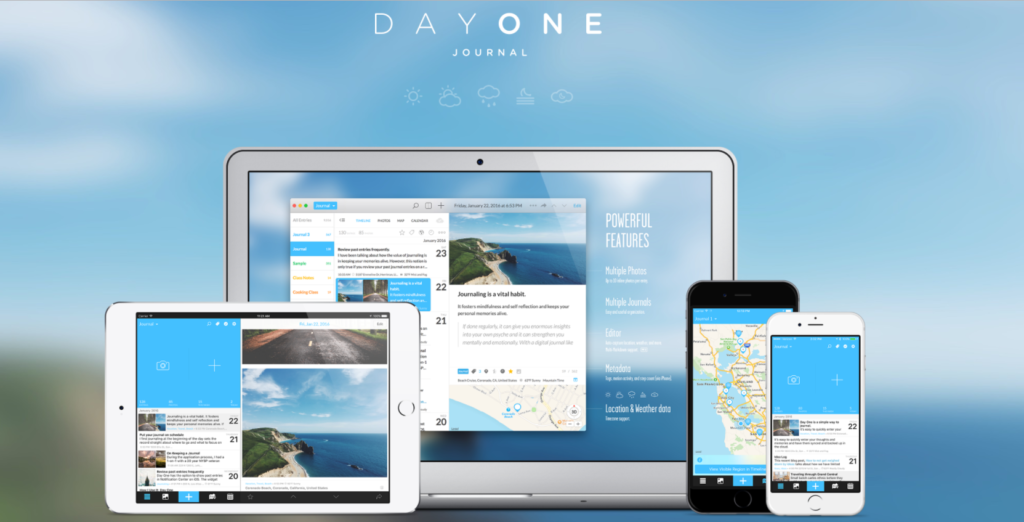
Although I have always preferred to make notes longhand (sometimes before typing them onto computer), when working on my PhD, at one point I began to realise that this time this could be a problem. Notebooks with all my “research notes”, including chapter drafts, notes from the literature I was reading, methodological decisions, and general considerations regarding all other aspects of this complex research study, were scattered around the house and it was becoming increasingly difficult to find them, or anything in them. This is when I decided to “go digital” in this regard, and I have used software for keeping a researcher diary ever since. I use Day One Journal app for this purpose and I find it extremely useful and functional. I hadn’t really done any research into the available software, or compared any, prior to choosing this app. From what I remember, it was just the first one I had a chance to work with, and I did not see any reason to change it into something else. I’m also sure there are a number of other apps that can be used for keeping a researcher’s diary, as well comprehensive reviews to be found online, if you want to make a truly informed decision. For me, Day One Journal worked great, mostly because of its simplicity and the fact that the entries are backed up in the cloud, as well as synced between the devices. I could, therefore, access the journal or add new entries from my iPhone, iPad and laptop. This was important to me, as it made it possible to have constant access to the diary and to make entries, or record emerging reflections, at any moment a thought arose. I would often write something down (usually a thought about the data analysis, or something to consider with regard to methodological choices) on my iPhone on the way home, for example, and then open it on my laptop once I got there. It’s a simple thing, but I found being able to do this invaluable at the time. Another useful option in Day One is the use of ‘tags’ to categorise each entry. For example, a tag called ‘sampling’ could be ascribed to each entry regarding sampling decisions, which could be easily accessed later and distinguished from all other entries. I gradually began to use the diary for pretty much everything related to my research. I input notes from the literature I read and tagged them “literature” (or used multiple tags like “literature”, “methodology”, “interviewing”, etc.) to later (sometimes even after a year) open all my notes regarding this topic. I could also easily access all my considerations with regard to any aspect of my study, or my reflections after interviewing the research participants, etc. Sometimes I even took photos of my “real” notes, and added them as entries in my diary, in order not to lose them (again). You can easily access a list of all the tags you made, which is almost like a table of contents of what you have in your journal. Finally, this app is free, which is also an obvious advantage. As a disadvantage, I think it only supports iOS operating system. I’m sure, however, that something very similar can be found nowadays for Android as well. Below are a few screen shots of my Day One researcher’s diary that I used when working on my PhD study.
Line-by-line coding in NVivo 10 and 11

In this post, I explain how to do line-by-line coding in Nvivo 11 and how to overcome the limitations of NVivo 10 to apply this coding technique. Briefly on line-by-line coding Line-by-line coding refers to applying codes to each line of qualitative data (e.g. interview transcript). I find this technique extremely useful when I really want to “dig deep” into my data and extract as much as possible from it. It is commonly associated with constructivist grounded theory (Charmaz, K. 2014 – Constructing Grounded Theory. London: SAGE.), because it is particularly useful when we don’t want to impose a pre-existing framework onto our data, but rather to let new themes emerge from it, which constructivist grounded theory researchers mostly do. If you are investigating a “new”, or under-researched, phenomenon, such approach may enable you to effectively discover its various components, while also controlling your own assumptions about it, as the initial, detailed codes you are creating are, essentially, a summary of what was said in a given line of text. I will post a separate entry about line-by-line coding elsewhere, and for now I will assume that since you want to know how to apply this kind of coding in Nvivo, you have already made an informed decision as to why this approach suits you. Line-by-line coding in Nvivo 11 At the time when I was involved in my study of Polish migrants’ English Language Identity, I was working with NVivo 10, which was much less adjusted to line-by-line coding than Nvivo 11 currently is. In both versions of the software, after you code each line of the text, then go to VIEW > CODING STRIPES, the box on the right-hand side will show you the “stripes” indicating the codes (or, in Nvivo’s tems, nodes) that you used. The improvement that Nvivo 11 introduced is that the stripes clearly indicate the length of the coded text. Therefore, as you can see in Figure 1 below, it is possible to easily distinguish between the codes, and attribute these codes to the text, even if each line is labelled with another code. Figure 1 Although this is a major improvement from the previous version, which was much more “clumsy” in this respect, it is my personal opinion that it is still not as practical as it should be. Once you created a big number of codes, constantly having to look at these numerous, vertically aligned and colourful, codes may be very exhausting. If you are working on NVivo 10, or have Nvivo 11 but are not satisfied with how the codes are shown, read the following section on what else can be done to make line-by-line coding appear in a more “traditional” way (i.e. with codes being shown horizontally next to each line). Line-by-line coding in Nvivo 10 Unfortunately, doing line-by-line coding in Nvivo 10 is not possible without having to “go around” its limitations. Although you can, of course, code any given line, word, or piece of text you want, the problem is that when you do line-by-line coding, you ideally want it to show next to the next you coded in a clear way, so that you can easily inspect the data (particularly because there may be so many codes in the text – I created 190 codes from my first 5 interviews in my study of English Language Identity!). The coding stripes in NVivo 10, however, do not correspond to the length of the coded text on the left hand side. Figure 2 shows coding strips for an interview extract with each of its lines coded. Figure 2 You can clearly see in the above figure the problem with line-by-line coding in Nvivo 10 is. So what can be done about it? The following is a way around this limitation. It is time consuming, but it’s worth it if you really want to apply this kind of coding in Nvivo 10. Also, remember that you usually do line-by-line coding just for the first few sources (e.g. interviews), until the point when there is no need to create new codes, as the newly inputted data could be fully covered with the existing codes. In my case, this point occurred after 5 interviews. After that, you will start to minimize the number of your codes, to put them into categories and synthesise them into more inclusive and broader themes. To do line-by-line coding in Nvivo 10, I first used Microsoft Word. I created a table with 2 columns, and pasted the interview transcript into the left-hand side column. Then, as I was reading the text, I put the newly created line-by-line codes in the right-hand side column, next to the text to which the code referred. Of course, the “codes” are not really that in Microsoft Word. They are merely your notes on how you will later code this next, once you import the document into Nvivo. You can see what this looked like in the following figure. Figure 3 You can see that although it is not perfect, and the “codes” are sometimes “pushed” a little bit too far down, or up, by the other codes, it does make it possible to indicate what happens in each line, and it is often recommended that line-by-line coding is used to do just that – to summarize what is happening in each line of the text. In the next step, I imported the file to Nvivo just like I would normally do with another interview transcript. This is where the boring part starts, because now, using your right-hand side “codes” as a guidelines, you have to select and properly code each line in Nvivo, replicating the Microsoft Word “codes” you previously created (Nvivo will not automatically recognise your Microsoft Word codes as codes, for NVivo they are just part of the text you imported). From now on, the line-by-line codes in the right column of the table will only serve as a reminder of which codes were used
Galloway, Kriukow and Numajiri’s (2017) report of a study of EMI (English as a Medium of Instruction)

This paper is a report of a study which aimed to understand the new and emerging global trend of EMI (English as a Medium of Instruction). You can view the report HERE